
Cart is empty









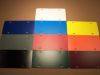
Die-Cut Color Chart * Print Color Chart
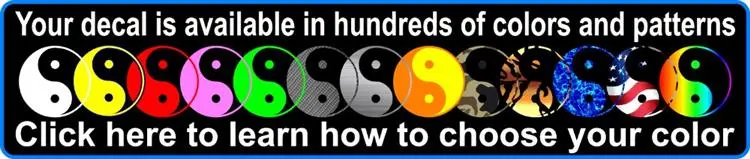
Most decals can be made in any color you want.
Outlines, Shadows and Contours for your Decals
Outlines, Contours and Shadows
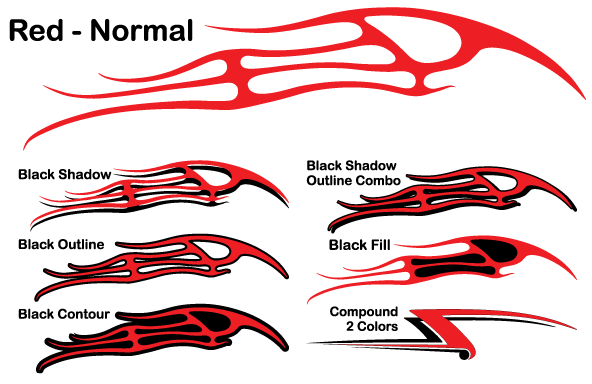
All Outlines, Contours and Shadows are two separate decals. The Outline, Contour or Shadow is applied to the surface first and then the top layer is added to give one of the looks below.
Shadows
Shadows consist of 2 identical but separate decals that you off-set during installation. In the image below the black decals were installed first then the red was installed over the top. As you can see you may off-set the top decal in any direction allowing the shadow to appear above, below, left, right or any combination of directions.
 Click to enlarge
Compound 2 Colors Decals

 Click to enlarge
The Compound 2 Colors option is used for two different colors in one design. As shown in the images above the design is mixed with black and red. This will consist of two separate color decals that you will line up during installation. When choosing this option state specifically in the comments box what parts of each decal you want for each color.
| More Compound 2 Color Examples |
     |


Outlines/Inline VS. Contours VS. Fill InIn the images below the first decal has no extras added to it. The design with RED is an Outline/Inline while the BLUE is a Contour. Outlines/Inlines follow around all cuts (inside and outside of the design). While contours only follow around the outside of the design. A FILL IN will be the same as a Contour withOUT the background color going past the edge of the design. For most designs and Outline/Inline works best for lettering/numbers. While a Contour or Fill works best for art designs like cartoons or animals.
| ||||||


 | |
| Here is a Punisher decal with 2 Color option examples.  Click to Enlarge | |
More Examples of Outlines, Contours and Fills.
| More Outline/Inline Examples |
   |



| More Contour Examples |
    
|


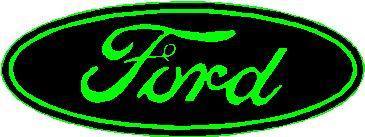

| Some FILL Examples |
   |
 |
-
We use the terms "decal" and "sticker" as being equivalent so don't be confused that one product may be better than the other due to the title.
-
Our decals are made from commercial quality vinyl that will last several years in harsh outdoor conditions. See color chart and/or material chart (if a full color print) for outdoor life expectancy for your particular design.
-
They come with adhesive on the back of the decal. Note that we do also offer front adhesive decals.
-
All decals are CUSTOM MADE to your specifications of size and color/material.
-
Each design can be made in any size and are measured LEFT TO RIGHT. (*Except Stick Figure Decals). You choose the size in STEP 1 when ordering.
-
Our decals can be made in any color found on the color chart if you are chosing a color in Step 2. If this is a "full color" printed style decal (you are choosing a material, not color, in Step 2) then we may be able to still change the color but it would be a color from one of these color charts.
-
The white rectangle the design is shown on is not part of the decal. Most decals will not have a background; the majority of our decals are die-cut around the shape of the design unless otherwise noted or show. *Some "full color" decals will have white within the design. See the product information and the diagrams below for more information.
-
You may also choose to have a Shadow, Outline or Contour in an additional color for single color transfer decals.
-
Discounts are automatically added if you purchase more than one item. Items don't have to be the same to qualify for the discount.
-
Please see the FAQ page for answers to questions you may have.
-
Is the design shown above close to what you are wanting but not quite perfect? Use the "Ask a question" tab (above) to let us know what needs to be done to make it perfect for you. Or you can simply order and note in the comments box the change needed. We will make the change and email you before we ship if there are any questions.
-
Don't see what you want in our catalog? We specialize in Custom Decals and Custom Stickers so you can send us your idea and we will make it for you.
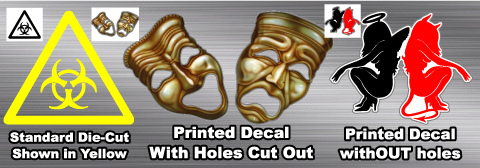
The image below shows 3 different decal styles. Use them to help visualize how your decal will look depending on what type of decal you are purchasing.
- The first one on the left is your standard die-cut transfer style decal. The image on the order form shows it in black (upper left hand corner of the image) but yellow was chosen for the color. As you can see the surface color shows through all the open areas within the design. See the order form image.
- The middle design is similar but is with a Full Color transfer decal. The design is printed but still has open areas within the eyes and mouth so those are cut out. You can see what parts will be cut out on a full color decal as there will be a thin gray line any place there is a cut. See the order form image.
- The final one on the right is a full color decal but there are no holes. The white edge wraps around the design giving it a white contour. Once again, the edge is represented by a thin gray line. See the order form image. *Note that we have updated this design on the website where the white part is cut out above the red girl's tail.
- If you have any questions please use the "Ask a Question" tab above find out more.
|
|





***
